Module @specs-feup/extended-task-graph - v1.1.0
Extended Task Graph
This is an implementation of the Extended Task Graph (ETG) intermediate representation for C/C++, built as an extension for the Clava C/C++ to C/C++ Source-to-source compiler. Just like the compiler itself, it is packaged and distributed as an NPM package, which can be either used as a standalone app or as a library for other Clava-based NPM projects.
These task graphs are automatically analyzed and characterized by several metrics, and through a highly flexible granularity mechanism we can perform extensive graph operations, such as task merging, splitting and clustering, while always outputting valid and readable C/C++ source code.
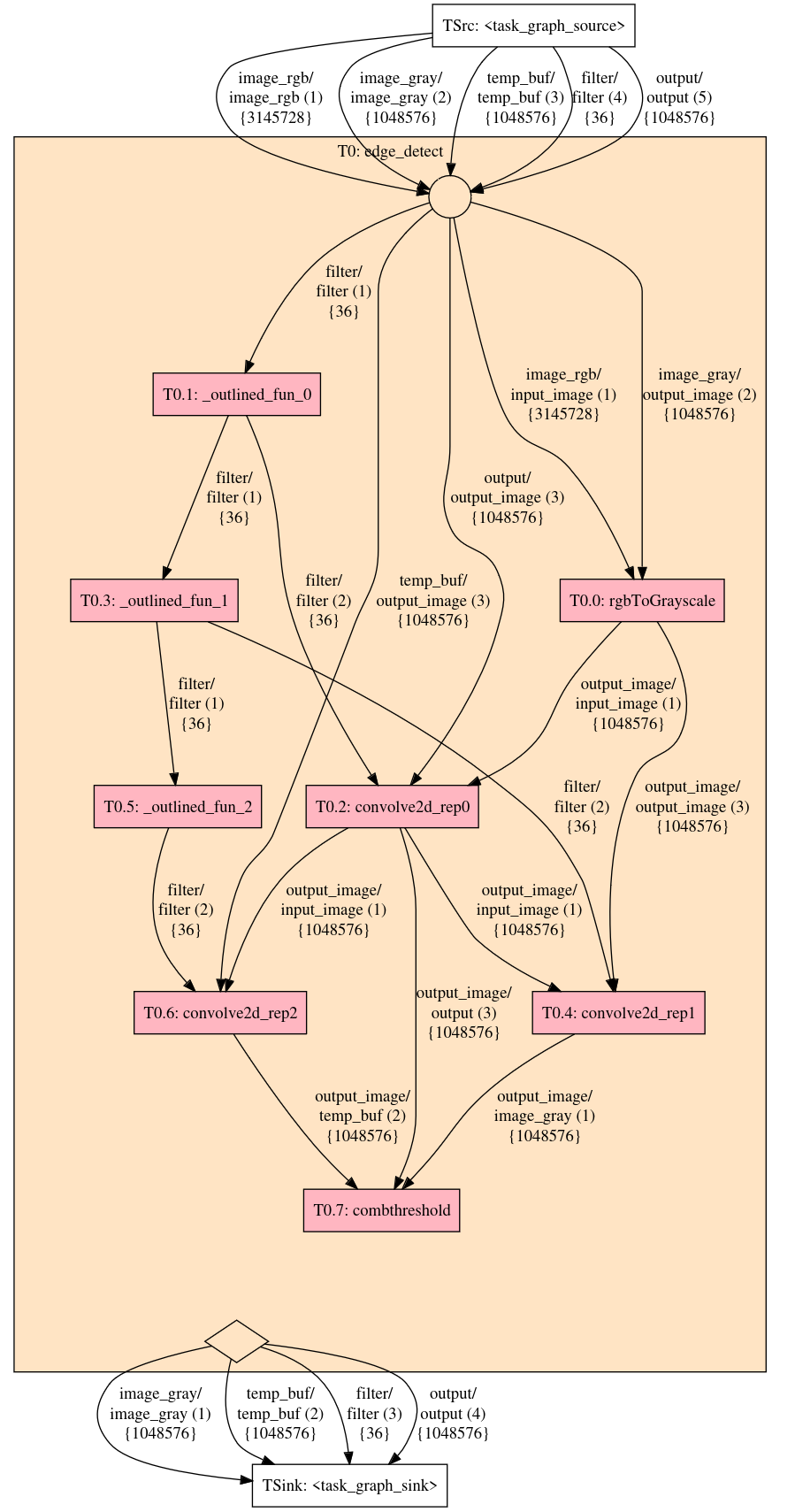
Extended Task Graph of the edge detection application in edge_detect.cpp
How to install
This package is available on NPM. Assuming you already have a Clava-based NPM project setup, you can install the latest stable release with:
npm install @specs-feup/extended-task-graph@latest
If you want to use unstable and experimental features, use the staging or nightly tags instead, as they are both built using the most recent commit in the repository. Nightly builds are built automatically every day, while staging builds are built on-demand:
npm install @specs-feup/extended-task-graph@nightly
Basic usage
To build an ETG for a given application, you can run something like this:
import { ExtendedTaskGraphAPI } from "@specs-feup/extended-task-graph/ExtendedTaskGraphAPI";
import { GenFlowConfig } from "@specs-feup/extended-task-graph/GenFlowConfig";
import { TransFlowConfig } from "@specs-feup/extended-task-graph/TransFlowConfig";
const topFunctionName = "edge_detect";
const outputDir = "outputs";
const appName = "edge_detect";
const api = new ExtendedTaskGraphAPI(topFunctionName, outputDir, appName);
// Run code transformation flow
const config1 = new TransFlowConfig(); // You can omit the configs if you don't change anything
api.runCodeTransformationFlow(config1);
// Run ETG generation flow
const config2 = new GenFlowConfig();
const etg = api.runTaskGraphGenerationFlow(config2);
This package offers more than this simple example. Check this folder to see more use cases.
Output folders
Under normal usage (i.e., running the entire flow from code preprocessing, task graph generation and subsequent extraction of metrics) this package outputs the following folders:
<app name>
├── ast
│ ├── original - some metrics about the original application's source code, as well as its call graph and AST
│ ├── trans - same as the above, but after applying all code preprocessing transformations
│ ├── <label> - a dump explicitly triggered by the user, using a subfolder name provided by them
│ └── <...>
├── etg
│ ├── default - a dotfile dump of the task graph generated by the graph generation flow, prior to any user transformations
│ ├── <label> - a task graph dump explicitly triggered by the user, possibly after applying transformations, using a subfolder name provided by them
│ └── <...>
└── src
├── golden - source code of the original program. It differs from the input only in that all macros have been resolved
├── inter
│ ├── t0-normalization - source code after applying the normalization transformation (which is always the first)
│ ├── t1-array-flattening - source code after applying the 1st transformation of the provided recipe (e.g., array flattening by default)
| ├── t2-constant-folding-propagation
| ├── t3-struct-decomposition
│ └── tn-<label>
├── subset - source code after the preprocessing transformations are applied, except for function outlining
├── trans - source code after applying function outlining, i.e., a valid representation for generating task graphs
├── trans_instr - the same as the above, but with time measuring instrumentation for each function. Useful for profiling
├── <label> - source code output explicitly triggered by the user, possibly after applying transformations, using a subfolder name provided by them
└── <...>
Citing this work
If you found our work useful, please consider citing it as follows:
@inproceedings{10.1145/3652032.3657580,
author = {Santos, Tiago and Bispo, Jo\~{a}o and Cardoso, Jo\~{a}o M. P.},
title = {A Flexible-Granularity Task Graph Representation and Its Generation from C Applications (WIP)},
year = {2024},
isbn = {9798400706165},
publisher = {Association for Computing Machinery},
address = {New York, NY, USA},
url = {https://doi.org/10.1145/3652032.3657580},
doi = {10.1145/3652032.3657580},
booktitle = {Proceedings of the 25th ACM SIGPLAN/SIGBED International Conference on Languages, Compilers, and Tools for Embedded Systems},
pages = {178–182},
numpages = {5},
keywords = {FPGA, Hardware Accelerators, Hardware/Software Partitioning, Source-to-Source Compiler, Task Graph},
location = {Copenhagen, Denmark},
series = {LCTES 2024}
}
Modules
- analysis/ast/ApplicationAnalyser
- analysis/ast/AstDumper
- analysis/ast/AstHtmlConverter
- analysis/ast/AstPlaintextConverter
- analysis/ast/CallGraphDumper
- analysis/ast/CallTreeDumper
- analysis/ast/LinesOfCodeCounter
- analysis/ast/SourceCodeStats
- analysis/taskgraph/CriticalPathFinder
- analysis/taskgraph/DataPathFinder
- analysis/taskgraph/DataPerTaskFinder
- analysis/taskgraph/DataSourceFinder
- analysis/taskgraph/GlobalDataFinder
- analysis/taskgraph/NoTaskHistogramFinder
- analysis/taskgraph/ParallelTaskFinder
- analysis/taskgraph/ProducerConsumerFinder
- analysis/taskgraph/TaskGraphAnalyzer
- analysis/taskgraph/TaskGraphStat
- analysis/taskgraph/TaskGraphStatFinder
- analysis/taskgraph/TaskPropertiesFinder
- api/CodeTransformationFlow
- api/ExtendedTaskGraphAPI
- api/GenFlowConfig
- api/InstrumentationFlow
- api/OutputDirectories
- api/PreSuffixDefaults
- api/TaskGraphGenerationFlow
- api/TransFlowConfig
- AStage
- EtgCli
- EtgEntrypoint
- EtgLogger
- instrumentation/InstrumentationAnnotator
- instrumentation/InstrumentationInserter
- preprocessing/profiling/FunctionInstrumenter
- preprocessing/profiling/LoopIterationInstrumenter
- preprocessing/profiling/ProfilingInstrumenter
- preprocessing/subset/CodeSanitizer
- preprocessing/subset/SubsetPreprocessor
- preprocessing/subset/SubsetReducer
- preprocessing/subset/SubsetTransforms
- preprocessing/task/AppTimerInserter
- preprocessing/task/OutlineRegionFinder
- preprocessing/task/OutlineRegionValidator
- preprocessing/task/ReplicaCreator
- preprocessing/task/TaskPreprocessor
- taskgraph/AccessType
- taskgraph/Cluster
- taskgraph/Communication
- taskgraph/ControlEdge
- taskgraph/DataItemOrigin
- taskgraph/dataitems/ConstantDataItem
- taskgraph/dataitems/DataItem
- taskgraph/dataitems/VariableDataItem
- taskgraph/dotfile/ClusterDotConverter
- taskgraph/dotfile/DotConverter
- taskgraph/dotfile/DotConverterDetailed
- taskgraph/dotfile/DotConverterMinimal
- taskgraph/PredicatedControlEdge
- taskgraph/TaskGraph
- taskgraph/TaskGraphBuilder
- taskgraph/TaskGraphEdge
- taskgraph/TaskGraphToJSON
- taskgraph/tasks/ConcreteTask
- taskgraph/tasks/ExternalTask
- taskgraph/tasks/ExternalTaskDataPolicy
- taskgraph/tasks/GlobalTask
- taskgraph/tasks/RegularTask
- taskgraph/tasks/SinkTask
- taskgraph/tasks/SourceTask
- taskgraph/tasks/Task
- taskgraph/tasks/TaskType
- taskgraph/transforms/ClusterExtractor
- taskgraph/transforms/ClusterOutliner
- taskgraph/transforms/TaskExtractor
- taskgraph/transforms/TaskMerger
- taskgraph/transforms/TaskSplitter
- taskgraph/util/ClusterUtils
- taskgraph/util/TopologicalSort
- util/ClavaUtils
- util/DotSorting
- util/ExternalFunctionsMatcher
- util/VarrefWriteChecker